





Role and permission
Find all the details of roles and permissions: ease of use for end users, precise control for administrators, and a foundation for more advanced rights management in the future.

Role and permission with Onoff Business
Thanks to an efficiency-driven structure, each team member only accesses the features that are relevant to them.
Three roles for streamlined organization
Three role levels for clear, seamless, and secure management of your Onoff Business workspace. This role-based structure ensures better distribution of responsibilities, smoother navigation, and full control over security within your organization.

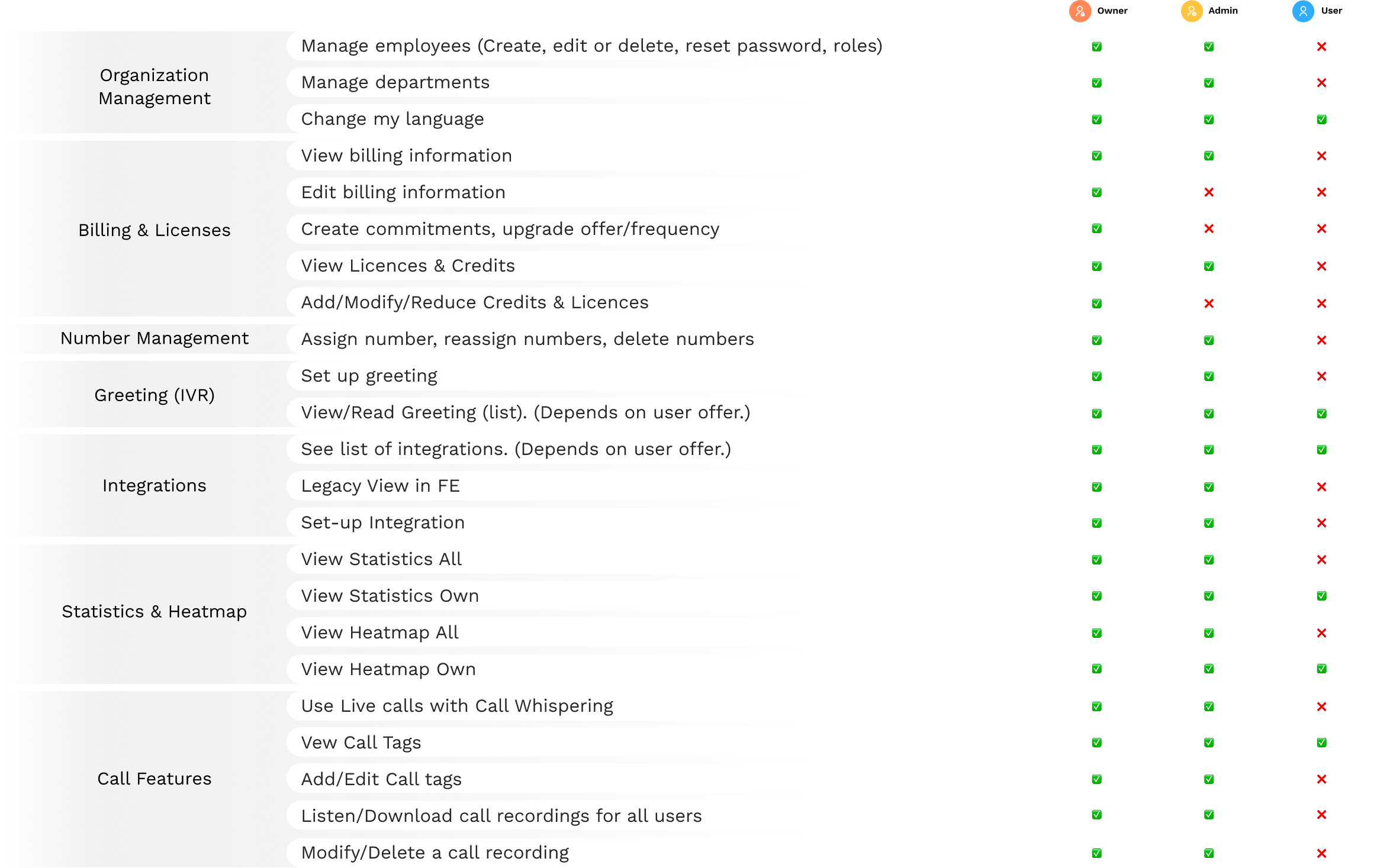
A clear and comprehensive permissions matrix
Each role comes with a specific set of permissions that define the actions a user can perform within the Onoff Business environment.
The matrix below provides a detailed overview of access levels for each feature — from employee management to call analytics — ensuring full visibility into what each profile can do within your organization.
Owner
Admin
Team Lead

User
Organization
Management
Manage employees (Create, edit or delete, reset password, roles).



Manage departments


Change my language


Billing & Licenses
View billing information


Edit billing information


Create commitments, upgrade offer/frequency


View Licenses & Credits


Add/Modify/Reduce Credits & Licenses


Number Management
Assign numbers, reassign numbers, delete numbers


Greeting (IVR)
Set up greeting


View/Read greeting (list). (Depends on user offer).


Integrations
See list of integrations. (Depends on user offer.)


Set-up Integration


Statistics & Heatmap
View Statistics All


View Statistics Own


View Statistics for own team(s)


View Heatmap All


View Heatmap Own


View Heatmap for own team(s)


Call Features
Use Live calls with Call Whispering


View Call Tags


Add/Edit Call tags


Listen/Download call recordings for all users


Listen/Download call recordings for own team(s)


Modify/Delete a call recording


More features
Somebody leaving the company? Reassign a number to another employee in a few clicks.
Transfer your current business numbers to Onoff Business in a few simple steps.
Buy credit and give your teams the flexibility to call premium numbers and make international calls.
©2025 Onoff Telecom
©2022 Onoff Telecom